Every app on your Mac.
At its own volume.
Turn a call down, keep the music up, and send each app to the speakers or headphones you choose. It lives in your menu bar, it is free, and there is no audio driver to install.
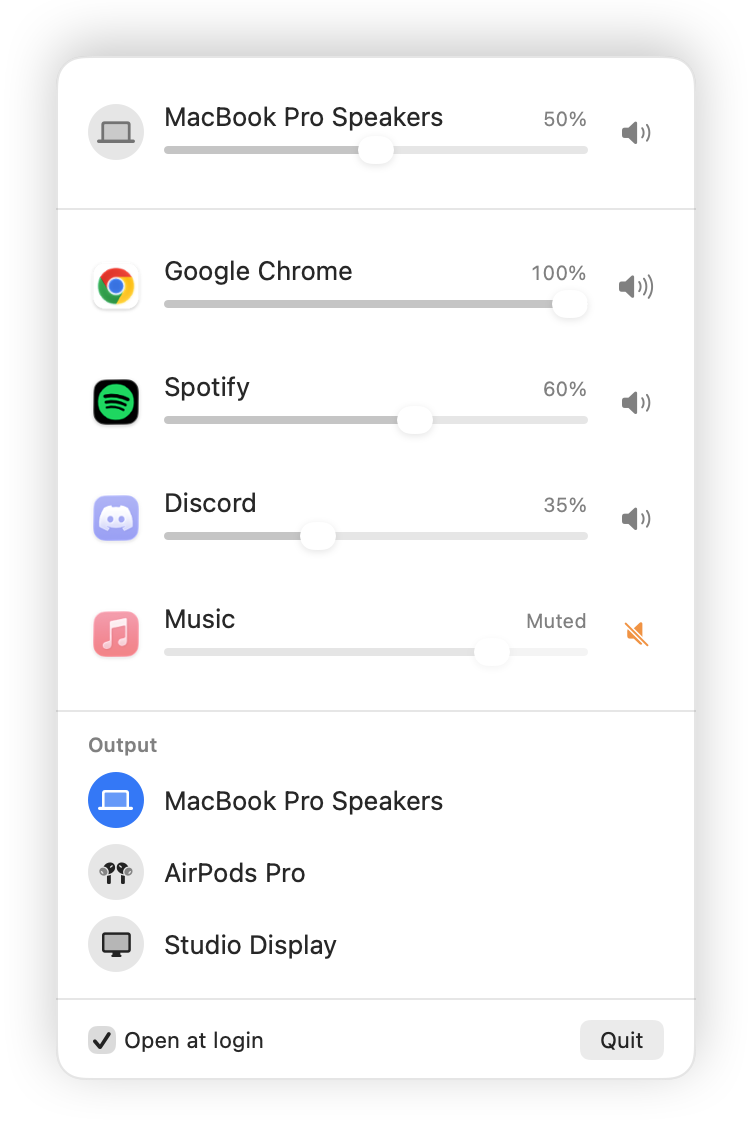
Works with anything that plays sound.
From too loud to just right, in one click.
- 01
Drag one app down.
Turn the browser down so it stops talking over your music. Nothing else moves.
- 02
Mute the one that won't stop.
Click the speaker next to the game. It goes quiet without pausing.
- 03
Pick where it plays.
Click the headphones on the video call to send it to your ears. The rest stays on the speakers.
 It remembers each app's level and output, so you set it once.
Calls in your ears.
Music in the room.
- Any app, any device. Speakers, headphones, a display or AirPlay. Each app picks its own.
- Falls back on its own. Unplug the headphones and the app moves to your default output.
- Comes back when you do. Plug them in again and the app goes straight back.
No driver. No clutter. No leftovers.
No driver to install
Built on the audio taps in macOS 14.4. Other mixers add a virtual sound card. This one is just an app.
Browsers are one row
Chrome, Safari and Electron apps play sound from helper processes. They fold into the app you know.
Helper (Renderer)Helper (GPU)→BrowserQuit, and it is gone
Every route belongs to the app. Quit it, or if it ever crashes, macOS removes them and your sound is back to normal.
Your sound stays on your Mac.
macOS asks once to let the mixer hear other apps. Nothing is recorded or saved, there is no account and no analytics, and the only network call is the update check.
Smorza Pro.
Set it and forget it.
The mixer above stays free. Pro lets it adjust itself. One-time purchase, no subscription.
- ProfilesGaming, Meeting, Focus. Every level and output with one shortcut.
- Auto-duckingMusic dips when someone talks on a call, then comes back.
- Boost to 200%For quiet videos and calls, with a limiter so nothing clips.
- Global mic muteOne shortcut, every app, and an indicator you can trust.
Questions before you install.
Why does macOS ask to record system audio?
To change an app's volume, Smorza takes its sound before it reaches the speakers and plays it back at the level you chose. macOS calls that recording, so it asks once. Nothing is saved or sent anywhere, and apps at 100% never go through the mixer.
Is it really free?
Yes. Per-app volume, mute and output are free, and the code is MIT licensed on GitHub. Pro adds automation on top and is optional.
Does it work alongside SoundSource or Background Music?
Tools that route the same apps can fight over them. Use one at a time for the apps you adjust.
Which Macs does it run on?
Any Mac on macOS 14.4 Sonoma or later, with Apple silicon or Intel.
How do I uninstall it?
Quit it from its panel and move it to the Trash. To also remove the permission, run this in Terminal:
tccutil reset AudioCapture com.rokoov.smorza